Sunday, April 29, 2012

cactus blooms, palace scenes, and a New England lighthouse

From earlier today,
some prickly pear cactus buds and blossoms
in the mountains around Tucson:
(some tilt-shifting to concentrate
the focus on the blooms and buds,
and a bit of vignette, using the center focus filter)

==============================================

In the last posting, I played with a snapshot
of the Throne Hall in Gyeongbok Palace in Seoul;
Here's another angle of the same grand, upswept building,
 still going for the 'scroll background' effect:

This is a 'transplanted' photo; I took it on my Canon,
then e-mailed it to my iPhone in order to snapseed it;
below is the original shot--late afternoon shadows made the
main façade very dark:
So, a bit of selective tool brightening and color-saturating,
and then de-saturating the sky before 
using one of the 'grunge' filters
to end up with the 'scroll effect' version.

=======================================

Another palace photo, 
showing an overview of one of Seoul's minor palaces--
this one taken with my iPhone on my last day in Korea last summer
--this is the view over the main courtyards of 
I had climbed to the rooftop terrace garden
of Seoul National University's Cancer Hospital
across the street from the palace in order to get this view,
and just then, the drizzle began to turn into a downpour...

The umbrella adds a certain effect,
but crop it out, and the focus is more on the architecture:
Using one of the grunge filters again,
this time I was aiming more for nostalgia instead of a 'scroll-painting' effect:
 Looking at it now, there's more blur than I would like on the sides...
will do some more tweaking later...

=================================================
To finish for this week,
a shot of what is perhaps the most-photographed-lighthouse in America,
in Cape Elizabeth, Maine:

This is another 'transplant;'
took this with my Canon a few summers ago,
e-mailed it to my iPhone a few days ago, 
and again, with the grunge filter 
(which seems to be my 'flavor of the month' right now),
I played around and ended up with this:
The crispness of the image contrasted with the watercolor-paper-feel of the background--
a combination that lends itself to a coastal scene...


Sunday, April 15, 2012

Against a 'naturally textured' background...Scenes from Gyeongbok-gung Palace in Seoul

One of the aspects of NE Asian painting that fascinates me is the fact that, often, no attention is given to the background in the scene; in Western painting, a canvas will be completely painted over with a base layer--showing the blue sky, for example. In many NE Asian scrolls, the silk or the paper is left in its natural state; the foreground elements are recorded in detail, but the artist feels no need to fill in the blank background space with a 'realistically-colored' sky: 

19th-century painting reproduction from:

The above silk scroll, depicting a ceremony in the Throne Hall of Gyeongbok-gung Palace in Seoul is a typical example of the 'raw parchment' look in many scroll paintings.

Or, below, in this handpainted hanji (artisan hand-made paper) scene of a drummer, the fibers in the paper are part of the rustic effect; no need to place the percussionist on an identifiable background when the textured paper contributes its own rhythm:


So, I thought it would be interesting to see if I could mimic the 'naturally textured background' of traditional Korean art by playing with some of snapseed's filters and applying them to some photos I took with my iPhone in Gyeongbok-gung Palace last summer. (A bit of historical background: Gyeongbok-gung was established as the seat of government when the Joseon Dynasty was founded in 1392.)

Here is a view of the Throne Hall depicted in the scroll painting above,
 "Geun-jeong-jeon:"


(Lofty architecture with a lofty title; 'Geun-jeong-jeon' means 'diligence helps governance.') 

Below is the original photo from which the above scene is cropped.
You can see how the mid-day lighting hides the colorful eaves in dark shadow.
Using the 'selective adjust' filter allowed me to specifically brighten the colorfully painted eaves.
Finally, applying one of the 'grunge' filter styles,
and then intensifying the 'texture strength' produced the 'parchment look' above.


(above panorama stitched together on the iPhone using "AutoStitch.")

This is the east gate of the palace, "Geon-chun-mun,"
meaning 'spring begins.'
Through it, you can see the double-roof of the Throne Hall:
I particularly wanted the 'grunge filter' to blur the street details in front of the gate--
painted yellow lines along a concrete curb don't belong in a 'scroll-painting.'

Below, experimenting with a different texture, a scene of the Palace's main gate,
"Gwanghwamun," with Bugak-san mountain behind,
taken from Gwanghwamun Plaza:

I don't like this texture effect as much as the texture style
used for the Throne Hall and the east gate,
but it does turn the otherwise pastel evening sky into a more 
neutral 'scroll background.'

A more close-up view of Gwanghwa-mun gate,
with a mythical fire-eating and justice-promulgating 'haetae' standing guard:

Looking through the central portal of Gwanghwamun gate,
leading to Heung-nye-mun gate,
which leads to the Throne Hall complex:
This style isn't my favorite, either,
but it shows another variation available in the 'grunge filter,'
a combination of edge-blurring as well as a sepia-tone 
to tone down the saturation,
along with the texture effect.

Another day, another scene through Gwanghwamun,
showing the re-enacting of the medieval Changing of the Guard:
By using the exaggerated texture in this scene, I was going for a watercolor-paper effect...

One last scene, from the rear gardens of Gyeongbok-gung Palace--
a hexagonal pavilion on an island in a lotus-pond,
the poetically named "Hyang-weon-jeon,"
'The Pavilion of Far-reaching Fragrance,' one of the loveliest spots in Seoul:
Again, I think this particular texture style is not as successful as what I used in the first photo of the Throne-Hall in mimicking the color and texture of a scroll-painting, but you do get an idea of some of the variations possible within the 'grunge' filter.

With digital photography and digital editing, it's more and more difficult for viewers to know if they're seeing 'what's really there' as opposed to something that's been 'photoshopped;' it's so easy to add or subtract elements from a scene now, to alter the honesty out of the frame. I used to be very wary of 'altered photos,' but if altering a photo means using certain filters to modify lighting, intensity of color, and point of focus, instead of adding or subtracting physical objects...if 'unaltered' photos can be compared to prose, perhaps 'altered' photos can be likened to poetry?--a certain way of distilling what the photographer wants a scene to convey. Prose and poetry can both convey truth, just in different ways...

[All photos in this posting were taken with an iPhone 4,
and edited solely using snapseed.]


Tuesday, March 27, 2012

step-by-step, from a sidewalk in Insadong

I've been meaning to post a complete, beginning-to-end, 'snapseeding' of a photo. Earlier today, I finally sat down in a coffee-shop, capturing step-by-step screen-shots on my iPhone: follow these shots and you'll get a step-by-step description of what you can do with snapseed.

Last summer, I spent a couple of days in Insadong (a historic neighborhood in central Seoul), and here's one of the snapshots I took with my iPhone--a 'haraboji' (respectful Korean term for 'grandfather') painting fans on the sidewalk:
From the snapseed app, you can open a photo directly from your phone's camera roll to begin editing.
(You also have the option of taking a photo directly from within the app.) One of the things that caught my eye in this scene was the expression on the young girl's face, her fascination as she watched the old artist using bamboo brushes to paint landscapes and calligraphy on the fan. In the middle of this frenetic smart-phone-crazed city, it was nice to see a parent and child enjoying traditional craftsmanship from the past...


Using the "tilt & shift" filter on the lower right, I wanted to narrow the focus so that only her face and the artist's hand would be in the same 'zone of clarity.' When you tap on the 'tilt & shift' icon, you immediately get this:
Whoa. A bit much. 
So, you can 'temper it'...
I use the elliptical option instead of the full linear option; you can use your fingers to determine exactly what you want to include in the clearly-focused area, how much blur you want, and where you want it to start--the 'transition zone:' 

Including the girl's face down to the artist's hand working on the fan, I also up the saturation a bit: 

 And so this is the result:

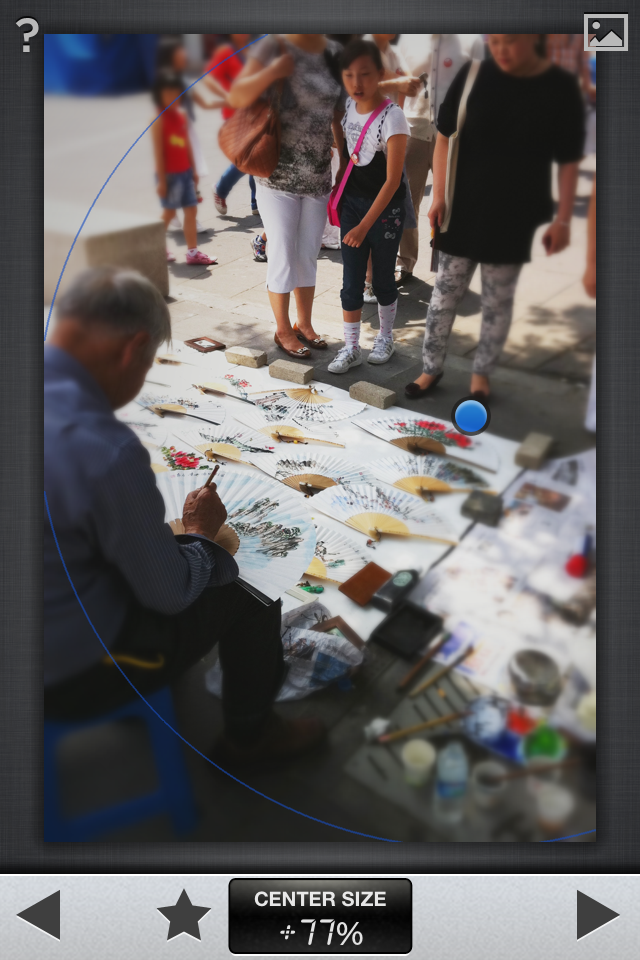
Wanting to have a bit of an old-fashioned vignette effect (darker corners), I then choose the 'center focus' filter. When that comes up, the photo seems instantly overly blurred. No worries--you can control that--note how I change the 'center size' (see the bottom of the shot) from "+20%"...

...to "77%," and also how I can shift the center (the blue dot) over:

So, now you can see the image with the corners slightly darkened:
 

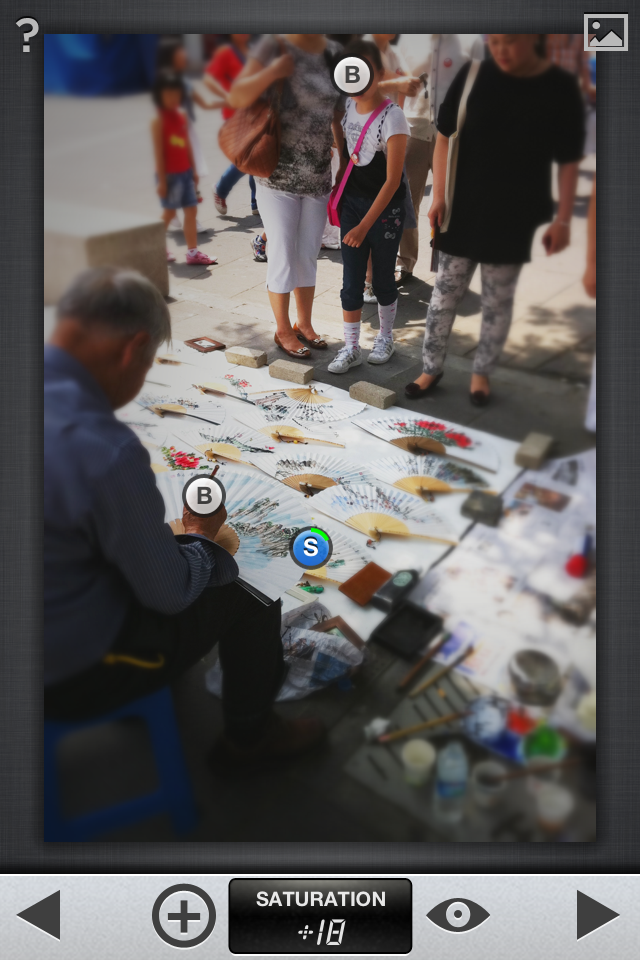
Next, using the 'selective adjust' filter, I can pinpoint spots where I want to play with the brightness, color, and saturation. The "B"-circle in the shot below shows that I've chosen to bring out the artist's hand...
 ...by brightening it a bit...
 ...and now the girl's face, also brightened a bit:
 ...and then finally, saturating the colors on the 
landscape painting on the fan a bit more:
Finally, a bit of tweaking with exposure and contrast--
using the 'ambiance' feature of the "tune image" filter:

And this is the final result,
focusing on the old-young, observer-creator axis,
'in the eyes of a younger fan:'

However, knowing that photos showing the recognizable face of a minor aren't always 'publishable,' (I didn't think about asking 'formal permission' of the girl and her mother to take their photo; it was just a candid phone-shot on a busy street), I thought another possibility from this scene would be to blur the edges some more, to zero in on the artist only instead of focusing on him and his admirer.

I go back to the 'tilt & shift' filter,
this time using the elliptical selection tool to focus on the artist's hand and his fans: 
 But seeing all the blurred faces at the top of the scene seems
distracting to me--makes me want to rub my eyes,
put in some eye-drops, check my contacts, etc...
too much blur.

 But I still want to focus only on the artist and his work. Time to crop:


...and then back to the 'ambiance' feature
in the 'tune image' filter:

...and finally,
why not?--let's frame it: 

 voilà, fini:
With so much manufactured now for the souvenir trade, it was refreshing to see this 'haraboji' painting his fans, one by one, inkstone at his feet, painting slowly in the shade...

Sunday, March 25, 2012

first and recent; too much and then none

No postings last week--getting food-poisoning while on an out-of-town trip--not fun.
Back home now.

I was going through my iPhone's camera roll, and thought I would post one of the very first photos that I 'snapseeded' back in December:
...kinda went crazy with the tilt-shift filter.
It was my 'flavor-of-the-month' I suppose, and I wasn't as judicious.
Still, it's a fun way to focus on a person, 
with shapes rather than details of architecture in the background.
Also, the flat rainy sky--boring--so, saturation and blur
focus on the person, while still allowing the atmosphere of the place
to color the scene--
definitely a snapshot of a memory
rather than architectural documentation...

Here's the original photo, taken last summer:
It's a downtown scene in central Seoul, showing some of the skyscrapers in the background of the Deoksugung Palace. Originally built as a prince's villa in the late 1400's, this complex became the final residence of the last king of the Joseon dynasty (1392-1910). It's one of the best spots in the city to photograph the juxtaposition of old/new, east/west, ancient/modern...

And with anything historical, the temptation to 'go sepia' is great:
Snapseed doesn't have a dedicated 'sepia' filter,
but using the black-&-white filter,
and then using the 'white balance' function
within the 'tune image' filter,
you can get the same effect.

So, two different snapseeded versions of the same photo.


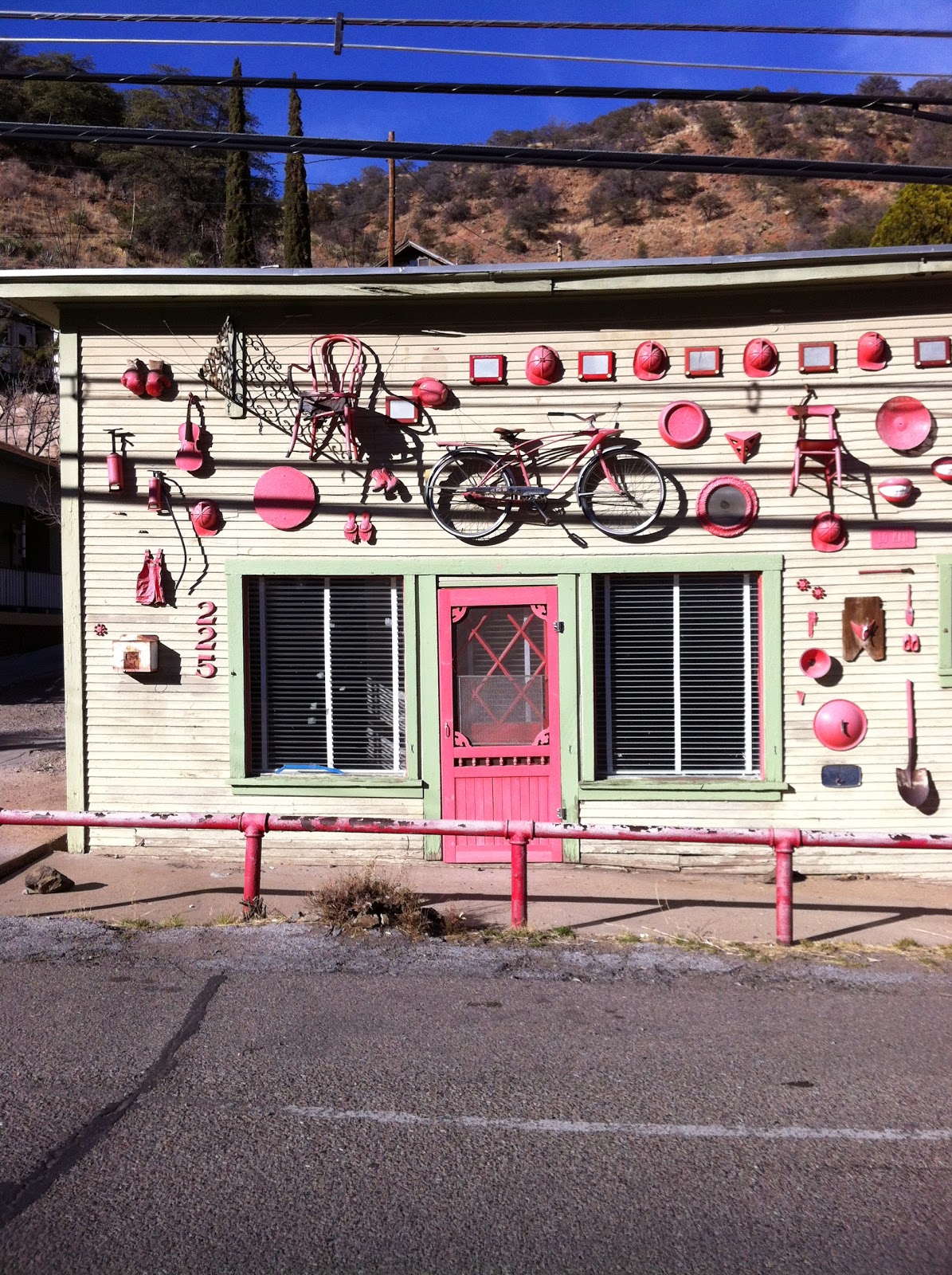
Now--a recent photo, close to home:--from the quirky mile-high mining town of Bisbee, in the Mule Mountains near the Mexican border in Cochise County, AZ:
225 Tombstone Canyon Rd.
Someone likes RED, eh? 
A façade of found objects...


No tilt-shift here--just some cropping and then warming up the color temperature a bit:
Gotta love the etch-a-sketch interspersed with the firemen's caps...


Tuesday, March 13, 2012

desert, jungle, palace, mountain...and 'bokeh'

I was flipping through the British magazine "Digital Photographer" the other day in the bookstore, and an article caught my eye: "Smartphones with shutters" (p. 58) In it, writer and photographer Dylan Baker highlighted these statistics (and the italics are mine): 

"Of the estimated 600 billion digital photos taken annually, over 60 per cent are taken on cameraphones--and the market for point-and-shoot cameras themselves remains flat. It seems that the point-and-shoot may eventually be replaced by the smartphone, with compact system cameras and DSLRs remaining the ideal choices for enthusiasts." He goes on to write:  "Since the launch of Apple's App store in 2008, and subsequent offerings such as Android's Marketplace, there have been more and more reasons to use a smartphone as your primary everyday camera. Apps have transformed the experience with everything from basic editing tools to programs that will emulate the look and feel of vintage cameras and film..." Also, there is the convenience: "The fact that you'll always have your phone on you is one of the greatest benefits of shooting with a smartphone."

So...on to some more snapseeding from the past week.

First, from last weekend's wildflower hike in Catalina State Park, just NW of Tucson. Last fall and winter gave us well-timed rains, and so the poppies, lupine, and paintbrush are putting on a welcome display in the desert--nice to see after last spring's drought-and-late-freeze-induced no-show.

I took this shot with my Canon, but then thought it would be fun to snapseed it, so I e-mailed it to my iPhone. (This was before I found out that Nik software just released snapseed for desktop--both OS X and Windows...but I still prefer the intuitive--and portable!--'swiping' on my iPhone.)


So, with a bit of tilt-and-shift, as well as the center-focus filter for the vignette effect,
voilà, a 'transplanted' and snapseeded desert wildflower scene:
I posted the photo, and immediately got a comment: "Nice Bokeh!" Well, thanks...except that it's not really 'bokeh.'  This photo effect (taken from a Japanese word), has always been reliant on lens and aperture settings...but now, with digital darkrooms, you can do a pretty good job of simulating it. It's amazing how easy it is to do with snapseed.

================== 

Now...on to Guatemala. Several years ago my wife and I were fortunate enough to be able to visit the Mayan ruins in Tikal National Park, in the NE of the country, in the Petén region of the Yucatán peninsula. The temple pyramids in the jungle are among the tallest stone structures ever built in the Americas; not until skyscrapers arose in New York in the 20th century did construction reach higher! I had just bought my first digital camera--a 5 MP Canon point-and-shoot...still learning how to use it while trekking beneath the howler monkeys and strangler fig vines...From the top of Temple IV (about the height of a 25-story building), I took this view of the tops of the Jaguar Temple and the Mask Temple:

I've always had fun with 'my-feet-in-the-scene-shots,' but ACK!--the flash went off! 
Blurry feet and everything washed-out...
So--a fun 'remember-that?' shot, but not really anything to 'show'...
So, I thought I'd snapseed it:
some cropping,
more saturation in the sky, (using the 'drama filter'),
and a bit of tilt-and-shift around the temple-tops peeking above the forest canopy:
The sky's not perfect--but this 'transplanted' photo is a much better travel snapshot than the original, no?

==================
Now, for the palace.
Covering 78 acres of hilly forest in the heart of Seoul, "Huweon," the 'rear garden' of Changdeok-gung Palace is better known by the city's millions as 'Biweon'--'the Secret Garden.'


Once exclusively for the Royal family, today it's a favorite spot for local couples and foreign visitors alike. In the early 19th century, the Joseon dynasty kings built, in the middle of this wooded enclave, a 'country-villa,' (part of which you see below), as a rustic respite from the duties of governing. Even royalty needed an oasis from the fishbowl of the palace, it seems.


I spent an afternoon alone here, contmplating history and family...a few weeks later, it was a joy to show my wife, on her first visit to Korea, these lush grounds, strolling in the summer rain.
I took this doorway shot quickly; my Canon's battery had died,
and all I had was my iPhone...
Months later--flipping back through my phone's photos,
this scene was crying out for some tweaking:
a bit of cropping,
some tilt-shifting to get the focus through the doorway,
then converting to black and white,
and then 'warming up' the 'white balance' in the 'tune image' filter,
I got this semi-sepia scene:
...walk into the past...

================== 

And finally, tonight, a scene from what was home for us during the last year we lived in Seattle,
when we returned from living in Nicaragua. On an early autumn morning, this scene of Mt. Rainier looming over the fog, from our apartment balcony:
This was taken with the same Canon 5-megapixel point-and-shoot 
that took the original Guatemalan scene above. 
So--another 'snapseed-transplant:'
I didn't tweak this one too much--
just some cropping
and a little bit of 'tilt-and-shift'
so that the trees in the foreground would blur,
setting off the distant fog and mountain in clearer focus:
When "The Mountain is out," as Puget Sound residents say, everything else pales...
This glacier-covered volcanic giant presides over the entire landscape.
When the fog blankets the valleys, urban and suburban sprawl disappear--
enjoy the feeling of being alone with sky and mountain, 
on top of the world, even if only for a morning.